Try Google Drive: organize files, folders and permissions with AI now, no sign-up needed

Google Drive: organize files, folders and permissions with AI · Bring order to the Drive you already have
For freelancers, agencies, professional firms and small and medium-sized businesses with thousands of files like “final budget (2) copy.” We give you your industry’s naming convention, renaming for your own files, the folder tree as a ZIP, the permissions policy and Drive searches ready to paste.
In the features that use AI, responses are generated by artificial intelligence and are not a substitute for professional advice.
같은 광고를 계속 쓰고, '아직 있나요?'에 스무 번 답하고, 커버가 모바일에서 잘려 보이시나요?
반복적이면서 돈이 걸린 작업이 세 가지 있는데, 쓸 만한 도구는 없습니다. 기존 도구는 전부 보기 좋은 콘텐츠를 만드는 사람에게 맞춰져 있기 때문이에요. 여기서 차별점은 AI가 아니라 매체를 잘 아는 것입니다. Facebook은 데스크톱과 모바일에서 커버 사진을 서로 다르게 잘라 내므로, 뷰어가 내 이미지 위에 두 가지 잘림 영역을 겹쳐 그려 줍니다. 두 화면 모두에서 보이는 공통 안전 영역은 초록색으로 표시하고, 잘려 나갈 영역은 잘라 내는 대신 어둡게 처리해서 게시 전에 잃게 될 부분을 미리 볼 수 있어요. 둥근 프로필 사진이 놓일 위치와 Facebook이 그룹 이름을 쓰는 띠 영역도 함께 보여 줍니다. Marketplace 광고에서는 메시지를 줄여 주는 것이 핵심입니다. 설명에는 상세한 상태, 그리고 직접 고른 내용을 바탕으로 서버가 구성한 배송·결제 안내 블록이 들어가고(AI가 쓰지 않는 이유는 지어낸 판매 조건이 구매자에게 거짓말하는 일이기 때문입니다), 첫 메시지에서 요일과 시간대를 물어보는 마무리 문구도 들어갑니다. 내 카테고리의 FAQ는 미리 답변이 달려 있고, 정보가 부족한 곳은 지어내는 대신 눈에 띄는 표시를 남겨 직접 채우도록 합니다. 사진에는 미관이 아닌 보안 문제가 있습니다. 집 안에서 가구를 찍은 사진에는 집의 좌표가 들어 있을 수 있어서, 서버가 방향을 맞추고 정사각형으로 자른 다음 메타데이터가 전혀 없는 파일로 다시 만들고, 전달하기 전에 GPS나 카메라 태그가 하나도 남지 않았는지 다시 읽어 확인합니다. 치수, 잘림, 라벨, 배지, 가격 구성, 스팸 방지 사전처럼 기하학이나 고정 규칙에 해당하는 모든 항목은 AI도 회원가입도 없이 즉시 계산됩니다. 그리고 Facebook 규격처럼 유효 기간이 있는 항목은 버전과 날짜를 함께 표시하며, 확인되기 전까지는 미확인으로 표시됩니다.
See the tools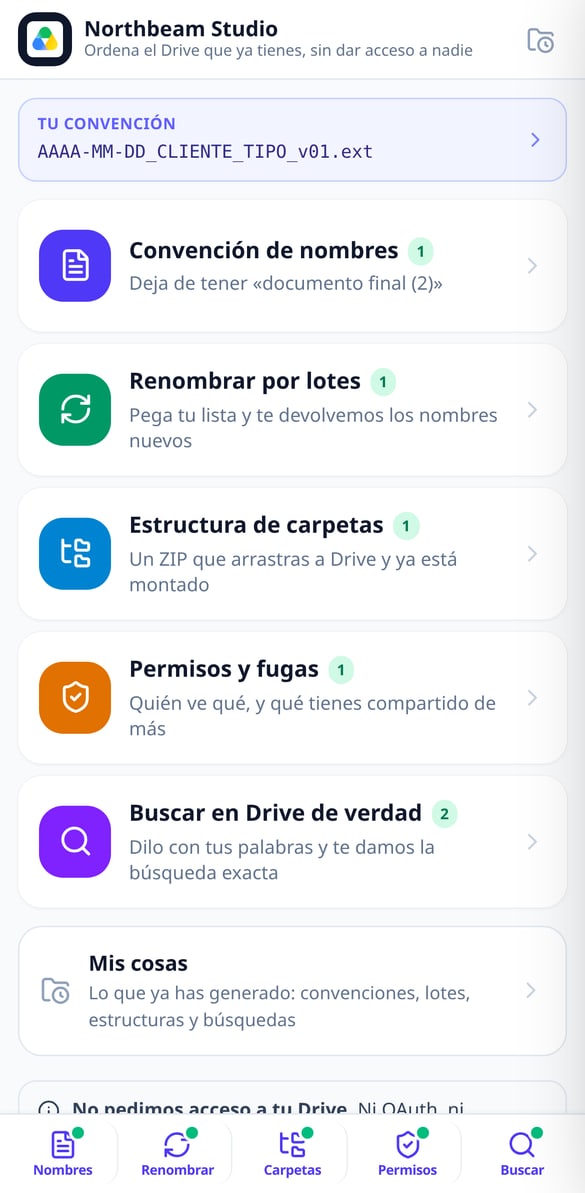
Discover every feature in detail

File Naming Standard by Industry | Google Drive
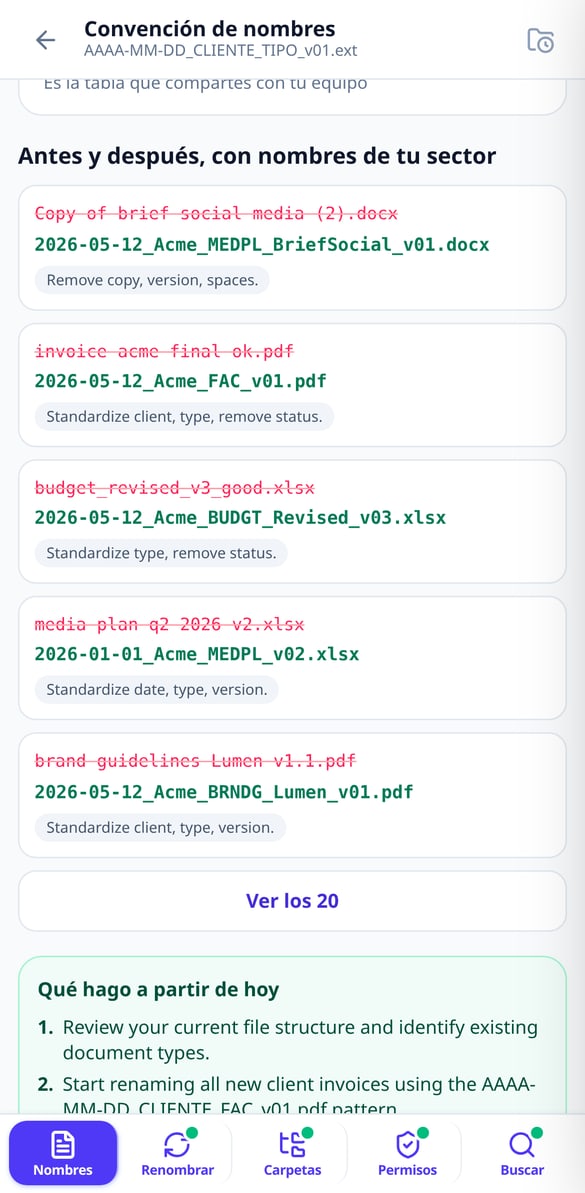
Choose your industry and the naming blocks and get the complete formula (YYYY-MM-DD_CLIENT_TYPE_v01), the 5 rules, your profession’s abbreviations, and before & after examples. Without connecting your Google account.
Try it free
Batch Rename Files | Google Drive
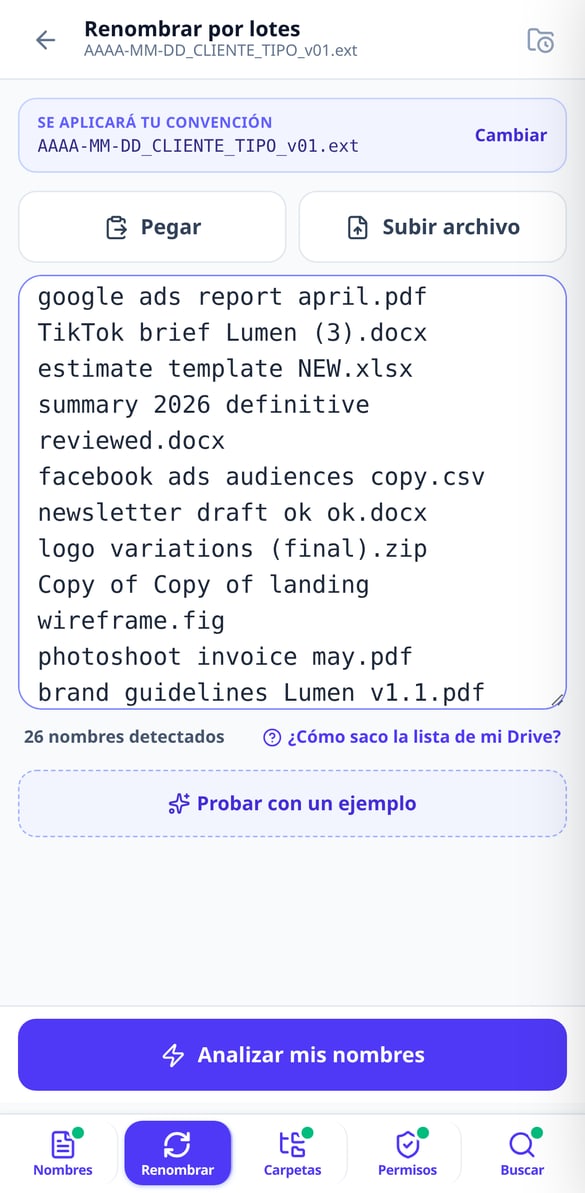
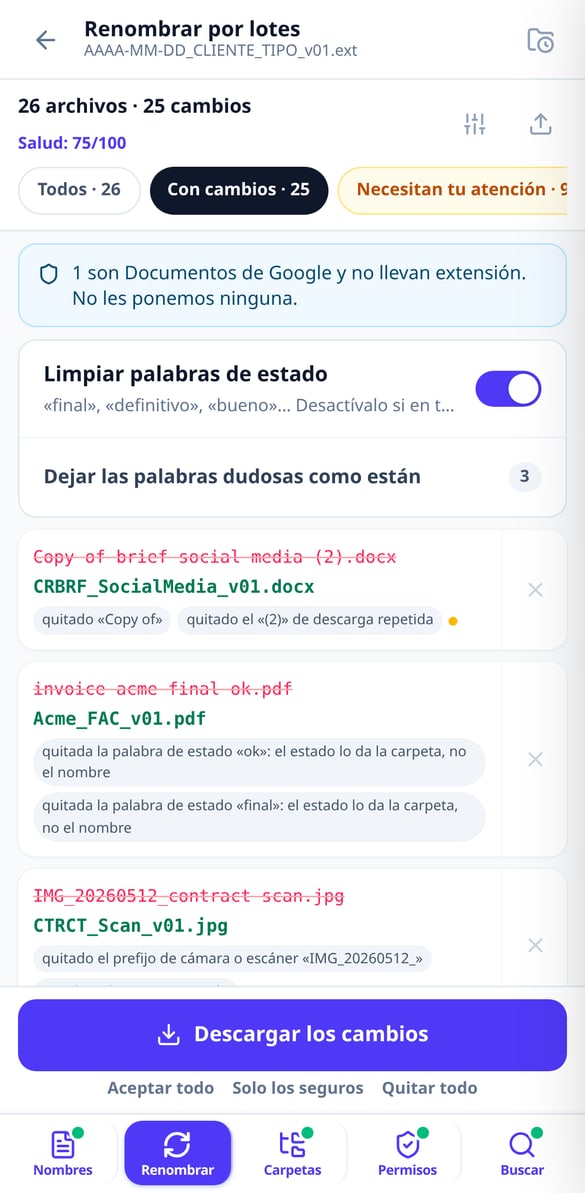
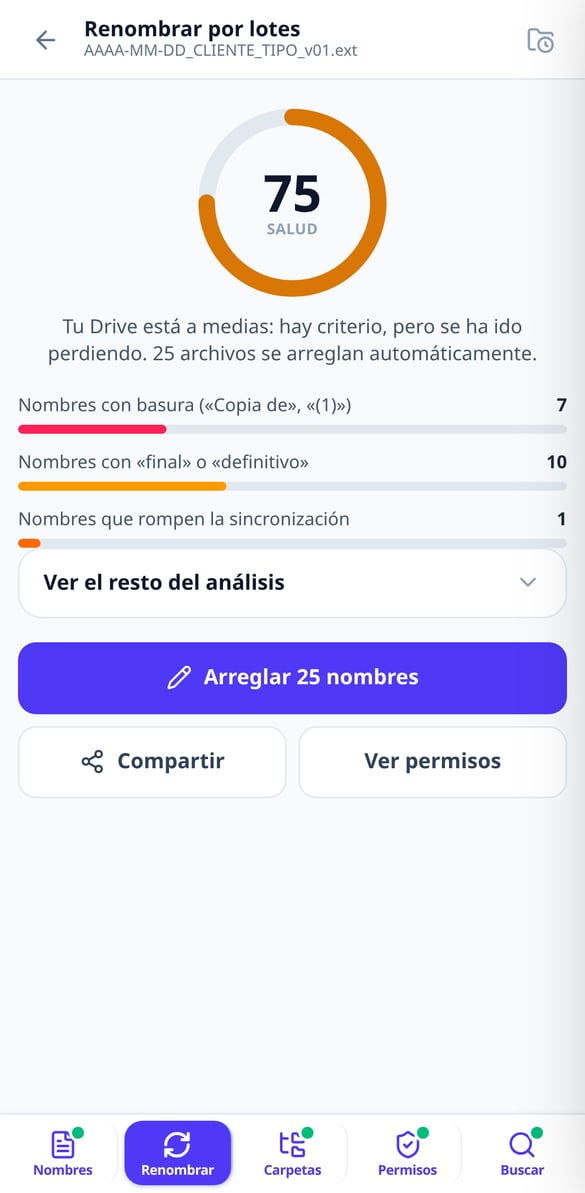
Paste your file list and get a table showing current name → new name with the reason for each change. Up to 1,000 names, export in CSV or XLSX, and a script to apply it to your Drive. Without connecting your account.
Try it free
Apps Script script to rename files in Google Drive
Generate a Google Apps Script script with your name mapping already included: it runs in your account, with test mode enabled, resumable batches, and a final report. Without us needing access to your Google Drive.
Try it free
Google Drive Health Score: Grade your clutter
Paste your file name list and receive a score from 0 to 100 with a public formula: junk in names, status words, sync-breaking characters, duplicates, and mixed dates. Without connecting your account.
Try it free
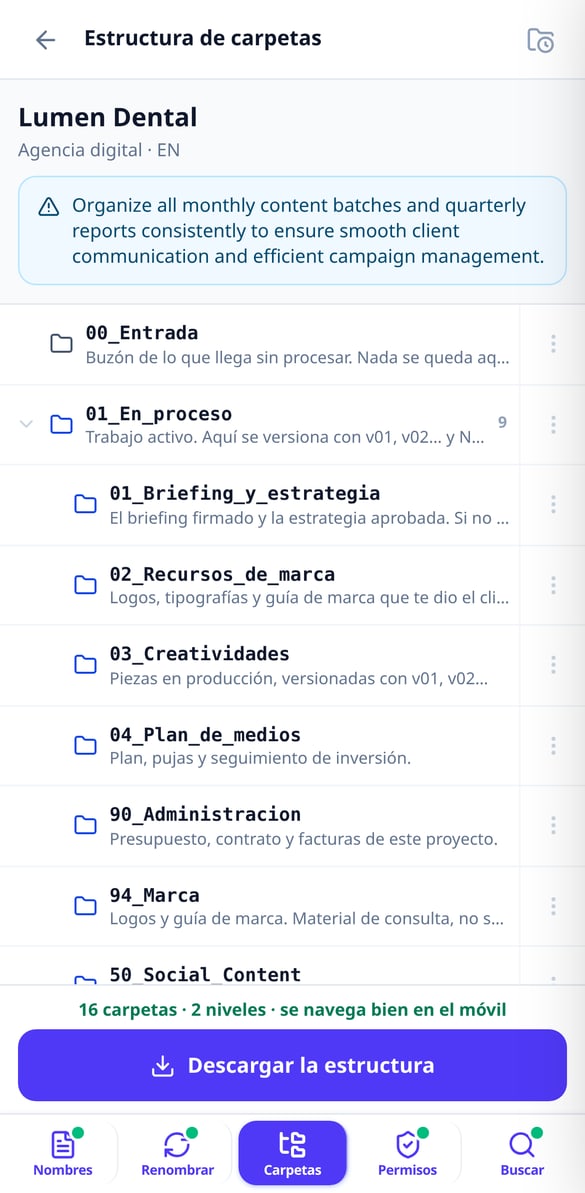
Folder Structure for Google Drive Ready in ZIP
Choose your work type and we’ll set up the project folder structure for you, numbered so Drive orders it and with a maximum of 3 levels. Download it in ZIP and drag it to Drive. Without connecting your account.
Try it free
Google Drive Permissions: Your Policy in Five Questions
Answer five questions and we’ll give you your Google Drive permissions policy in writing: calculated risk level, My Drive versus Shared drives matrix, eight audit searches, and the offboarding checklist. Without connecting your account.
Try it free
Advanced Google Drive search in natural language
Type or dictate what you're looking for and we'll give you the exact advanced Drive search query: type:, title:, owner:, from:, after:. Explained piece by piece, ready to copy. Without connecting your account.
Try it freeFive tools for the Drive you already have
대부분의 기능은 AI를 호출하지 않아요. 서버가 sharp와 고정 규칙으로 계산하며, 계정 없이 작동하고 비용도 들지 않아요. AI는 도움이 되는 곳, 즉 글을 쓸 때만 개입해요.

Naming convention and batch renaming
Choose your industry from 11 and get the naming formula (YYYY-MM-DD_Client_TYPE_v01), your industry’s document abbreviations and 20 before-and-after examples. Then paste your names —up to 300 without an account, 1,000 with an account— and we’ll return the “current name → new name” table with the reason for each change, in CSV or XLSX.

Folder tree ready to drag and drop
Choose your type of work from 11 and we’ll build the structure by lifecycle —an intake folder, a work-in-progress folder, a client review folder, a deliverables folder and the archive—, numbered so Drive sorts it for you and with a maximum of 3 levels so it stays navigable on mobile. Each folder comes with its written guide inside. Take it as a ZIP or create it in your Drive with the script we give you.

Auditable permissions and searches that actually find
Five questions and you have your written permissions policy, the My Drive vs. Shared drives matrix, the checklist for when someone leaves and 8 audit searches. Describe what you’re looking for in one sentence and we’ll give you the Drive query explained operator by operator, with a link to open it in your account.
Three steps, nothing to install and no permissions to grant
도구 선택
마켓플레이스 광고, 커버, 그룹 중에서 고르세요. 특정한 것을 찾아서 들어왔다면 바로 해당 화면으로 가고, AI를 호출하지 않는 기능은 회원가입 없이 작동해요.
정보나 사진을 입력하세요
광고용 입력란 다섯 개, 커버용 내 이미지, 또는 그룹용 칩 네 개예요. 긴 프롬프트는 필요 없어요. 세밀한 작업은 서버가 해요.
복사하고, 붙여넣고, 다운로드하세요
각 블록을 한 번에 복사해서 Facebook에 붙여넣거나, 깔끔한 사진과 업로드 규격에 맞는 구성 요소를 다운로드하세요. Facebook에는 직접 들어가세요. 우리는 계정에 손대지 않아요.
Frequently asked questions
Your Drive organized today, not “someday”
광고나 커버부터 시작해 보세요. 체험하려고 계정을 연결하거나 회원가입할 필요가 없어요.